Buy anything from 5,000+ international stores. One checkout price. No surprise fees. Join 2M+ shoppers on Desertcart.
Desertcart purchases this item on your behalf and handles shipping, customs, and support to Grenada.
👓 Elevate your reality — see bigger, play smoother, work smarter!
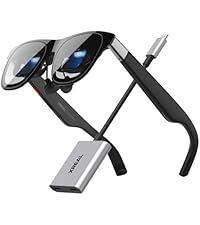
XREAL One AR Glasses combine cutting-edge X1 spatial computing chip technology with a massive 147" virtual OLED display and ultra-low latency for an immersive, lag-free experience. Designed for professionals and gamers alike, these smart glasses offer adaptive lens transparency, precise IPD adjustment, and broad compatibility with leading devices via USB-C. Whether you're streaming, gaming, or working remotely, XREAL One transforms any environment into your ultimate personal screen.


| ASIN | B0FDPGHVCB |
| Additional Features | 120 Hz FHD Display, Dual Ipd Design, Lightweight |
| Age Range Description | Adults, Teens |
| Band Material Type | Silicone, Rubber |
| Best Sellers Rank | #2 in Video Display Glasses |
| Brand | XREAL |
| Built-In Media | Nose Pad (S/M/L) and C-C Cable, Prescription Frame (No Lenses Included), Protective Case and Cleaning Cloth, User Manual, XREAL One Pro AR Glasses |
| Closure Type | Temple Pieces |
| Color | Black |
| Communication Feature | Bluetooth, Wi-Fi |
| Compatible Devices | iPhone 16/15, Android phones, Steam Deck, ROG Ally, MacBook, Windows PCs |
| Compatible Phone Models | Android Devices, Ios Devices |
| Connectivity Technology | USB |
| Customer Reviews | 4.0 out of 5 stars 702 Reviews |
| Display Type | OLED |
| GPS | No GPS |
| GPS Geotagging Functionality | No GPS |
| Global Trade Identification Number | 06976143801498 |
| Human Interface Input | Buttons |
| Item Dimensions | 1.97 x 3.94 x 1.97 inches |
| Item Weight | 87 Grams |
| Manufacturer | XREAL |
| Maximum Display Brightness | 700 Nit |
| Model Name | X1112 |
| Model Number | XREAL One Pro |
| Operating System | Proprietary (Android & iOS compatible) |
| Resolution | 1920 × 1080 |
| Screen Size | 171 Inches |
| Shape | Rectangular |
| Special Feature | 120 Hz FHD Display, Dual Ipd Design, Lightweight |
| Supported Application | Camera, Music Player, Phone, Video Record |
| Unit Count | 1.0 Count |
| Warranty Description | 1 Year Warranty |
| Warranty Type | Limited |
| Water Resistance Level | Not Water Resistant |
| Wearable Computer Type | Smart Glasses |
C**E
Perfect for watching movies on an airplane
I had the previous generation xreal glasses and they were very good with a few annoying problems. This generation Xreal one fixes all of the problems with the previous generation and add more features. One of the most useful features is the ability to pin the virtual screen to real world space meaning you can move your head to the right and you see the image being left on your left side as your face turns away from it. While this is required for augmented reality, even for a more practical use, which is watching a movie on an airplane on a virtual 100 inch plus screen it is very handy to be able to turn your head slightly away to focus on something in the real world, merely by moving your head without having to fumble for your phone to hit the pause button or taking off your glasses completely. In fact, a feature in these glasses that is combined with the screen being to the physical direction is the ability for the glasses to turn off the black background temporarily when you shift your head away from where the screen is. When you are watching something on the virtual screen, it is very useful for the glasses to enable their black filters which prevents outside light from coming through the virtual screen. This was something that the old generation had as well, but this new generation can now toggle that black filter automatically as you turn your head to look away from the virtual screen, making the glasses be completely see-through to where you can see whatever you are looking at. Another cool feature is a virtual big screen meaning that not the entire entirety of the virtual screen is visible at the same time. So for example, in normal virtual screen mode, you don’t have to move your head or your eyeballs really to see the entire screen because all of it is in your field of view. With the big screen feature turned on the image is projected onto a virtual screen that is bigger than the LCD panels in the glasses, which would simulate the type of experience that you would have in the movie theater if you were sitting toward the front of the theater. Where you only see about 60% of the screen directly in front of you and you have to turn your head left or right to see the rest of the screen. This is actually a more natural way for us to view things because in the real life you tend to turn your head, slightly left or right or up or down as you’re looking around. And finally a third feature of these glasses, which is a little bit more advanced to get into but nonetheless very cool is if you have a video game that is capable of turning on virtual reality mode using “side-by-side“ then these glasses can actually act as VR glasses not just AR glasses. I have done this successfully with the video game called elite dangerous where turning on side-by-side 3-D mode creates a screen that is essentially 19 20 x 1080 x 2 meaning it’s actually 38 40 x 10 80. The left half being your left eye and the right half being your right eye. Using settings that are built right into the glasses you can enable this mode and it will split that very wide signal coming from your video game into a left eye and right eye allow allowing you to see full 3-D imagery as you are navigating your way in the video game. This is exactly what VR glasses costing hundreds of dollars more will also do, but in a much more compact and cheaper set of glasses. I highly recommend anyone that travels to buy these glasses to have a huge screen to watch movies on or do computer work on a flight and for anybody else that wants to have a portable large screen experience right from your phone or laptop anywhere you happen to be even if that is in your bedroom.
N**N
The future is finally here
This is the future. This does not feel like a tech demo, it feels like a well thought out, high-quality device. It is incredibly simple to use, just plug into your device and then bam, big screen with your content. The screens are extremely high quality, bright, and razor sharp. As far as the sound quality, I was honestly blown away. Built in sound may not seem like a big deal, but being able to plug in and not have to worry about extra cords or putting in headphones makes all the difference in it's usability for me to just grab and go. This has become a device that I use every single time I play on my steam deck and a device I use often when watching movies or shows. Couple of small things I would like to see improved upon: • The ability to adjust the volume directly from my glasses • I love being able to customize the shortcut button but please allow me to set "Side View" as one of the options • The ability to play/pause my media with my glasses (Getting a call and having to fumble around to find your device, open the portfolio cover if it's an iPad, then hit pause is annoying) Side notes: • If you wear glasses you will MOST likely need the glasses inserts. I can get away with playing in VR without glasses but these I literally could not use without the inserts • If you want to charge your device while you use the glasses make sure you get a quality adapter like the Viture USB-C to Glasses and Charging Adapter. I tried going cheaper but the sound wouldn't pass through to the glasses. Don't make the same mistake I made • These are NOT normal sized glasses, you will look a little goofy in them but they aren't really made to walk around and use at the same time • The lens transparency feature is cool but feels more like a gimmick (unless you find a good use for "Side View" mode. There has not been a single occasion where I wanted any other transparency than just the darkest. (You can just tap a button to get full pass-through without the screen so you are good if you need that) Couple of tips/tricks: • You can increase quality by a bit by turning off stabilization (this makes smaller text easier to read and I feel like the image is sharper as well) • Turning off stabilization allows you to adjust the brightness which helps a TON if you are wearing them at night • This also allows you to adjust the color tone. I like to skew it towards the oranges in the evening so it's easier on your eyes • Try the different nose pad sizes, it took me a little bit to get it to fit exactly how I wanted and feel perfectly comfortable • Connecting to an iPhone 14 or older (lightning port) requires a lot of cables (Lightning to HDMI Adapter, HDMI to USB C 4K with USB C powered (two female USB C ports)) - Now you can plug your glasses into the HDMI to USB C adapter but you need to also power the adapter so you will need a power bank if you are on the go and another USB C cable. ALSO, this does NOT charge the phone, as you need to plug a lightning charger into the Lightning to HDMI Adapter to supply power to the phone. Final thoughts - I love this device, this now goes with me when I travel and I absolutely love laying on the couch and playing my Steam Deck while I look up to the ceiling and see a huge screen. It has added new life into games that just don't pop on smaller screens or games where you need to spot smaller things. $500 feels a bit steep but the quality of the device IS top notch and I have zero regrets getting this device in particular. I have also owned and used a multitude of VR headsets and while that is a different experience, it does eventually become cumbersome and you lose interest and doesn't add a lot of daily value. This is more like having a set of AirPods. I carry them around so I can easily enhance my listening experience instead of listening to music from my phone speaker. These are the same, it easily enhances your long form media consumption.
M**S
Immature tech and a huge disappointment
For the price of these I was expecting at least a pair of display glasses that simply worked consistently. These are not that. I wanted to like these so badly but they are insanely frustrating. They are full of issues and, as someone that manages tech development, I can tell you it's obvious they rushed this device to release way before it was ready to go to market as a stable product. They are using you as the customer to field test and perfect their immature product. And they are charging you $700 to do it. This is a prototype worth about half that with its current issues. Where to begin... And keep in mind I returned my first pair for some of these reasons, thinking I got a defective pair and the same issues were in the second pair. -The glasses get hot and make your nose and face sweat and then they don't stay in place. - They disconnect constantly (every few minutes) on mobile devices. It's so aggravating . They appear to at least work well on windows PC. - The anchored video drifts non stop. You anchor and 5 minutes later it's nowhere near where you set it. Feet away on the real world overlay. - there are blurry spots on the optics that persist like an eye floater. Both pairs had these in slightly different spots. - The display gets a horrible interference pattern on windows PC for things like spreadsheets. It makes looking at them so fatiguing. The crazy thing is if you start to tilt your head, when you get to about 45 degree angle it disappears entirely. This tells me it's some kind of polarization issue in the display and they didn't orient it correctly for eliminating this. No one tested on MS excel?? I feel like these didn't get usability testing at all... XReal, please hire a Human Factors team. - The pinned video always ends up drifting to not level. They added an update to calibrate this but it doesn't stay level. It always goes back to about 5 or 10 degrees off. It's so distracting. - The adjustments for view angle don't ever seem to get the display in view right. Messing endlessly with the digital display settings doesn't help this. - I have never been able to get the 3d features to work consistently. These aren't without value - I do use them and I do like them when they actually work and I don't have to fuss with them longer than I want to use them. I originally got these after a spinal neck surgery to keep my work posture straight and prevent neck pain. They work awesome for this - but again, for every hour I use these, I spend 10 minutes adjusting and resetting things to how I want it. The wide screen on windows is awesome and you can fit about 3 screens worth across a very large screen that appears to be about 6 feet wide and curved. Really cool and useful. Keep in mind the weird patterns and the fact that every time you connect them you have to cycle through settings to get back to this because it won't default to what you want. You can set hot keys but it only helps a little in set up overhead. The real redeeming quality is the chip that allows these to be plug and play on any device without an app or middleware or accessory. That's the reason I went with XReal over competitors. I'll continue to use these because of how much I spent and that they are still useful despite the frustration. But these are going to be a other expensive embarrassing purchase like an old palm pilot or a blackberry. Seemed awesome at the time but was just stepping stone tech not ready for use cases that lasted more than a year or two before something really good came out. My take? unless you're desperate for a ergonomic set up like me to reduce pain, wait a year or two and then invest in something light-years better for cheaper.
B**O
Ideal Glasses for Portable Devices – Perfect for Low‑Movement Sessions like Gaming & Movies
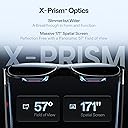
I would recommend the Xreal glasses to anyone who wants a minimal movement, extra large, high quality, visual experience with their portable devices (phone, tablet, laptop, and portable gaming devices such as steam deck, especially steam deck like systems). The most exciting use was sitting down with the phone watching a movie or with the steam deck. Especially with the steam deck where you could be comfortably reclined (like on the couch, bed, or airplane seat) and view a very large screen while also being able to comfortably hold the deck in your lap (rather than needing to hold the deck up to your face where it becomes tiring). While the glasses do draw additional battery it wasn't unreasonable and there are ways to mitigate the battery drain, by for example using a purpose made hub. I would not recommend these glasses, at this time, for desktop use. I would caution those looking for 'active' use, such as doing regular tasks while also having a screen strapped to your face (it works, but you can see vision is altered/obstructed slightly by viewing the world through the glasses, and others can see that you're beaming content to your eyes). Visuals: Very high quality with a screen size 171 inches when not in ultra wide (it claims larger in ultra wide, but that is because the screen curves), which is to say that it is still very large and your biggest issue will be the FOV (57 degrees) does not allow you to easily see the whole screen without it also clipping on the edges if you turn your head. By turning on follow mode you can mitigate this, which will cause the screen to gently glide with your vision rather being set in a fixed location (and is awesome). I personally recommend slightly reducing the screen size to fit easily within the FOV while also allowing minor head movements that will not clip the screen. This screen size will still be substantially larger than any normal TV you could purchase on the market, and it will be wherever you feel like you want it (awesome). If the exterior is very bright and you're wearing a reflective color (like white) you may have some visible light leakage from below into your lower vision, its not that bad but it is worth noting if you were looking for 'flawless' and can be mitigated a bit by location and apparel choice (don't wear reflective / white, especially in bright environments- in darkness it doesn't really matter). The electrochromic dimming, which allows the glasses to darken the lens themselves to make whatever is behind them, in the real world, less visible, helps mitigate this as well. Outside of the normal large screen and curved screen options there is also a PIP like mode where the screen is in the corner of your vision which could allow you to walk around and also have content. I personally was not able to ignore the altered vision through the glasses itself to find the screen in the corner acceptable, that said I believe some people could and for them this would allow them to do things like walk, cook, and other tasks while viewing content. You can see through them, its just partially darkened (even with electrochromic at minimum) and very slightly warped (like a less exaggerated form of looking through aquarium glass). There is a 2d to 3d mode, which is neat, but more of a gimmick- as you can see when the AI does not do it correctly, like early NVIDIA and AMD AI frame generating technology would create oil smudges on moving objects here too you'll see some AI artifacts sometimes. It's cool but would not be the reason I purchase a device. It should be obvious, but perhaps still said, people can roughly see the content you're looking at. These are not your stealth watch and play games while at work glasses ;). Sound: The sound is quite good and has minimal leakage if you control the volume. There is some leakage though, so be mindful of your surroundings or still use your headphones depending on the situation. Due to where the sound is being generated from, it will sound quite a bit different if you're laying on them and therefore covering the sound ports (so be mindful of this if you intend to strap yourself in for a long flight, or lay down, that you may also want headphones as the contact of other objects will alter the sound- you can hear it still but it will definitely not be what you'd consider 'intended'). Wear / Use: As mentioned in visuals, you can absolutely see through the glasses when they're not on, and you can increase or decrease the electrochromic dimming to make seeing through your content easier (or essentially impossible, which is great when you're wanting to focus on the content). That said, you will know you're wearing these glasses when they're not on, as they do slightly distort vision and the birdbath optics can be seen in your view too. The glasses themselves are not very heavy, and are comfortable to wear for extended periods of time so long as you do not have very sensitive ears. Some people report discomfort with the included nose pads, but I never had this issue, even when I pressed them against my face for as close as possible visuals, yet to note this product does come with additional sizes to help customize your experience and because they're removable you can change them to aftermarket options too. The glasses do generate heat, it was never enough to be annoying or distracting but you should expect your forehead to be warmed. While I would personally not see myself use them to do active tasks, I do like that I can make the glasses see through (through the electrochromic setting) and see things around me- as you do not need to take them off if you got up to go to the bathroom, do basic tasks, or to in general acknowledge your surroundings temporarily. If I needed to engage with the surroundings for longer term I would take them off, but having the ability to temporarily shift back in with ease was a notable plus. Like grabbing a drink or bite of food. There are much cheaper options that rely on physical barriers to not see through them, where the solution is not hard (take them off) the flow of being able to just do that quite task with them on is nice. Please note that these glasses are powered through their usb c connection to usb c (on the target device), and so you will be corded to something or they will not work. They do not turn on by themselves, there is no wireless feature. I did not find the wire to be a challenge, but I grew up with corded headphones and so this felt normal. If you're a wireless only person, then be aware that there is a cord and it must be used. Connecting these to a phone is relatively easy; however, if you have a Samsung phone your phone will most likely default to Dex while also not providing you a way to control Dex. You can go into settings to either default into just showing your normal phone screen (as it looks to you typically, and rotate to landscape for big screen vibes) or also go into settings and turn your phone screen into a trackpad mouse which will allow you to be in Dex mode while also controlling it via your phone screen (alternatively you could grab a bluetooth keyboard/mouse combo). Many modern laptop/tablets should plug in without issue as well. However.... if you want to use this on your computer you'll need to buy additional accessories or have an uncommon (for desktop) feature of usb c video. Even then there will be a number of potential pain points depending on how it's done and ultimately for myself.. my glasses didn't like the route taken even though it was in scope of regular use. Where my glasses just stopped working, while I read the customer service for Xreal is fine and so I don't have concerns there I had largely wanted to use them for desktop and since this event occurred I decided to work with Amazon instead for a refund (and so like phones I highly recommend buying through Amazon when possible, as it can reduce a lot stress and challenges you would get otherwise when not protected). The stars are not brought down for this issue as while they don't say it CANT be used on a desktop (yet you can find some help info created by Xreal on how you might achieve this) they also don't actively advertise that opportunity, so its more of an advance user and not really a target user use case (even though it is within the sphere of possible uses). When I was using these on my phone and steamdeck it worked perfectly, and particularly on my steamdeck these were very cool. Therefore, if you wanted to use this on your desktop, please note this and potentially consider waiting for the design to be improved- or understand you are the edge of use cases. In so much that if you wanted to use this exclusively for desktop, you should mentally remove stars from my review and potentially reevaluate if these are right for you - as for me it was not convenient and ended up causing issues with my glasses. One notable quality of life missing, especially while using the glasses with my phone, is that you may mentally want to use hand to grab content sometimes and that is not currently possible with the glasses (no hand tracking), but I suppose I should note that is a feature rare to all glasses of this field (at this time, soon it wont be!). Battery: These do not come with their own battery, they siphon from the device they're plugged into. This means whatever you're connected to will have a higher battery draw than without these glasses. The draw is not that bad; however, if you're not typically using your phone for videos non-stop and then you compare that to using this while also looking at videos non-stop... it's going to be a huge difference and make your phone battery look like it's flying. There are accessory solutions to allow the glasses to plug into a hub, which plugs into your target device, to make that device last longer (Xreal and others sell this battery hub, I would recommend it if you're going to use it for travel - as you cannot charge your device while also using the glasses without a hub, since it takes the usb slot, unless you have this hub as well or a device with multiple ports built in like some laptops). Material: The material feels sturdy and should hold up against regular use. The wings of the glasses have a bit of give on them, to open the frames wider, for larger faces- this could feel a little scary but is by design (assuming you're not trying to make them do the splits.. don't do that). Product packaging: High quality packaging, the type of boxes you get that are sturdy enough that you might want to reuse it for other things. It comes with a case for the glasses, though I wish there was a section dedicated to packing the cord with the unit (as mentioned the device is corded, so the cord goes with the glasses). Additionally there is the usb cord, glass cleaner, insert for prescription glasses, and multiple nose pad options included. Overall thoughts: The glasses look and sound great, with a great FOV for the field they're competing in (as of early 2026). Although you will pay for that when compared to other glasses, when these are on sale I think they are a good value for a premium product (there are cheaper options out there if you're willing to lose sight of real life all together or will not move your head AT ALL, where follow mode in these glasses make for a very comfortable experience). If you wanted an awesome way to enjoy movies and games on devices like your phone, tablet, laptop, or portable gaming device (steam deck, etc), these were a joy to use. If you are looking to replace your desktop experience I would wait for the technology to be refined. If you wanted to wear these while doing regular tasks, and don't mind ignoring partially disrupted vision, these are also interesting, but if you wanted to feel like a seamless AR experience then we are getting there but is not quite the tech you're looking for. When you're looking for far better FOV you will be starting to look at actual headsets rather than glasses (for now, technology is on the move!). The things that I would like improved most in these glasses are currently the bleeding of edge of technology and so I cannot really fault this product for not having the features that are not even out (yet). With higher FOV, and built in hand tracking, I think these types of glasses will really shine. TL;DR: 5/5 for passive low motion situations on portable devices, with an absolutely highly recommended incredible steam deck experience, your plane rides with these would be incredible. Particular the rating is in terms of products currently out there and available (EARLY 2026). This technology is improving rapidly, and by the end of this year all pain points mentioned above may not even be a thing (also check your updates on these glasses, as these glasses themselves do get updates that improve them). I am looking forward to the future with this technology, I would look into Aura by Xreal if you're looking for 'more'. I do not recommend this product if you're looking for desktop specific uses only, it was a 3/5 experience at best trying to get it to work, and I would highly recommend purchasing through Amazon if you're going to give this route a try anyways (for additional protection). I caution them if looking to use them for active conditions, like walking, or cooking, due to the minor visual changes (minor sunshade, even with low electrochromic settings, and visual aquarium-like effects). I highly discourage time sensitive safety important tasks, like driving as I would not even try it in that situation (outside of just the general concept of distracted driving, these slightly alter and obstruct your vision in such a way you will be less effective).
W**W
Honestly the future of displays. A must-have for international traveling
Love them bought them for a 24-hour one-way flight to vietnam. They work great with a steam deck and with my phone. My only complaint with these over the competitor is they do not have an ipd adjustment so I have to kind of shift them around on my face to fit a little bit but overall the vision quality is incredible the sound quality if you use the open air speaker is actually really good I just typically use earbuds to not be a nuisance to those around me. They will kill your battery quick so make sure you have a battery bank or you're plugged in somewhere but I mean you're running a full display. Absolutely love them and do not regret them even though I will probably get a set of vitures
A**W
Great headwear for those that can utilize it properly
Really happy for whoever this works for but I just can't get them to work. I think my eyes just don't jive well with AR and VR headsets. It's almost the same situation I found myself with the oculus quest 2 where despite the high resolution screens being pressed to the eyeballs, the edges would always feel a bit blurry and outside of moving pictures/games/videos/etc, text would always be a pain in the butt to read and sift through. It was the same experience with these glasses albeit with less facial heat dissipating since my face isn't sealed into the visor like it is with the quest 2. In this case no matter how much adjusting I did, from physical with the nose pads and legs, to virtual by changing the IPD, text strength, brightness, screen size, and more, I could not get these glasses to be both comfortable and practical and for the price I'm paying, I'm not going to settle for "ok?" In terms of feeling and usage. I work remotely, doing a lot of visual studio code. I'm used to my 34 in ultrawide moniter. The ultra wide mode on these glasses is absolutely nothing like my actual physical screen. I don't know how they're marketing it like using a Samsung 32:9 ultrawide cause it just doesn't feel like that at all. Feels like staring at a 32 in that's virtually curved. Not great. Also topping out at 1080p doesn't help as even at that close distance, convoluted settings aside, my eyes just couldn't stop focusing on the distracting blurs and rough edges of the text. Code on visual studio gave me a headache after trying for an hour. Also since I have a Samsung, fold 6 to be precise, I could only use these glasses in Dex mode which is not as user-friendly as simply mirroring your phone to the glasses and using it as so, like how it is with iPhones. So that sucks. Also doesn't work with switch 2 so if you were hoping for that functionality, keep waiting. Never planned on using this for my PlayStation so not testing that and I don't have a mobile gaming handheld like an ROG Ally. Used to but sold it. I'm sure these would have been nice on those but again, not for my use case. All in all, they're probably the best this AR glasses scene has to offer and the sound is great for what it is, brightness as well. I didn't suffer from random reflections as the prisms you're looking through are bent at an angle but that wasn't an issue. And being able to pin the screen so it's not following you around is a must, I don't know how these other companies don't incorporate that from the getgo. All in all, premium device but I think it's time to admit to myself that VR/AR headsets/glasses just aren't for me.
B**R
Excellent AR glasses with awesome features
These glasses are great! I have been using AR glasses for productivity and gaming since the NREAL Air back in 2022 and finally decided to upgrade. The One Pros are an improvement in every way. The built in 3DoF processing is super stable and does not drift after hours of use and is activated with a press of a button. Not having to rely on other processing devices or external software is the main reason why I wanted to upgrade to the One Pro. When you have the screen anchored in front of you the glasses automatically get dark around the outside of the screen so it's like you're in a theater, and then you look away from the floating screen, they automatically turn back to transparent, super cool and works really well for using your laptop screen in addition to the virtual one. Resolution is great and text is very readable thanks to the clarity adjustment and IPD settings (I am writing this review while wearing them). Built in menu and settings are easy to use and you can customize 3 quick settings that can be changed at the press of a button. 120hz refresh rate is awesome for gaming. The glasses sound fine, though I will mostly be using them with headphones so I didn't test this too much. While the One Pro is not the cheapest option out there, the features present over the competition was well worth the investment for myself. The built quality and included hard case also give me confidence they will last just as long as my old pair did too.
M**T
Great for travel, gaming, and watching shows on the go
I’ve been really happy with these glasses. I use them mostly for watching anime and playing video games while traveling, especially on planes, in airports, and at hotels. They make it easy to have a big-screen experience without carrying extra gear. The color is impossibly good and this is coming from someone with an OLED monitor at home. The picture looks great, and they feel especially useful in places where I want privacy or do not want to pull out a larger device. They have been one of those products that actually fits into my routine instead of ending up in a drawer. One thing I did not expect is how often people ask me about them when I am using them in public. They definitely get attention, and for me they have been worth it just for how convenient they are during trips. Overall, these have been a fun and genuinely useful travel tech purchase and absolutely worth the cost so it's a great value.
U**R
Disappointing!
I expected more from these glasses. The image quality, in particular, is disappointing — it lacks sharpness, especially when compared to competing products that deliver a noticeably clearer and more refined picture. The real-time 3D conversion is an interesting feature and a nice concept on paper, but in its current state it still feels more like a gimmick than a truly useful enhancement. It needs further refinement to become genuinely compelling. My main concern, however, is the limitation within the Apple ecosystem. When downloading movies for offline viewing — for example on a flight — DRM restrictions force you to use a lower-resolution version when connected to the glasses. As a result, the already limited sharpness is further degraded. Competing brands do not have this issue, allowing full-resolution downloads and a significantly better viewing experience. Overall, the concept is promising, but the execution — particularly in image clarity and ecosystem compatibility — falls short of expectations.
A**H
I Just Stepped Into a New World!
I was all set to experience this new tech , and it still blew my mind! Everything works great. However, I’m taking one star off to suggest improvements in the design and wearing comfort.
D**A
Good AR glasses
First time using AR glasses. I was a little surprised at the FOV being only at 50 degrees, but after using it for sometime, I got used to it. I’ve encountered no issues so far. They’re great for an extra screen for productivity purposes. I can open 3-5 windows with the ultra wide. Although, it’s a little blurry, but that’s expected with early generations of AR. While outside, it can be a little hard to see if it’s bright. In other words, you can see beyond the screen. But if it’s night time, it’s bright enough to block your vision.
A**I
I recommend
Good, better than VITURE
S**E
Great product
Planed to use for work and leisure but found that the words in PDFs and emails were just too blurry even though the super wide screen was helpful. Then I got the prescription lenses and it cleared everything right up. My prescription is very light so I thought I’d be fine without but even with the slight adjustment, it made all the difference. Goes without saying that these are great for movies but I like spreading my spreadsheets across the widescreen and bask in the huge amount of data. Still getting used to the limited field of view that comes with these types of glasses but I believe these are the best for that so can’t complain.
Trustpilot
3 weeks ago
3 days ago