Buy anything from 5,000+ international stores. One checkout price. No surprise fees. Join 2M+ shoppers on Desertcart.
Desertcart purchases this item on your behalf and handles shipping, customs, and support to Grenada.
🖨️ Print smart, live green, stay connected!
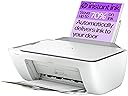
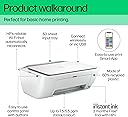
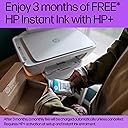
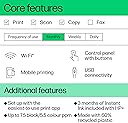
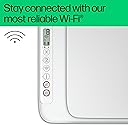
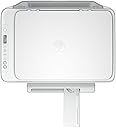
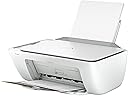
The HP DeskJet 2810e is a compact, wireless all-in-one inkjet printer designed for home use. It delivers reliable printing at speeds up to 7.5 ppm (black) and 5.5 ppm (color) with sharp 1200 dpi resolution. Made with 60% recycled plastic, it supports eco-conscious printing through HP’s Instant Ink subscription, offering 3 months free ink delivery. Easy to set up via the HP Smart app, it enables seamless print, scan, and copy functions with dependable Wi-Fi connectivity, making it ideal for everyday documents, photos, and labels.


| ASIN | B0CFFBXYSH |
| Additional Printer Functions | All In One |
| B&W Pages per Minute | 7.5 ppm |
| Best Sellers Rank | 1,065 in Computers & Accessories ( See Top 100 in Computers & Accessories ) 8 in All-In-One Printers |
| Box Contents | Return Labels, Labels, Favourite Recipes |
| Brand | HP |
| Brand Name | HP |
| Color Depth | 1 bpp |
| Color Pages per Minute | 5.5 ppm |
| Colour | White |
| Compatible Devices | [Partial] Computers (Laptops, Desktops) |
| Connectivity technology | Wi-Fi |
| Control Method | App |
| Controller Type | Windows |
| Customer Reviews | 4.1 out of 5 stars 7,253 Reviews |
| Display Type | LCD |
| Dual-sided printing | Yes |
| Duplex | Manual |
| Hardware Interface | USB |
| Ink Colour | Colour |
| Is Electric | Yes |
| Item Dimensions D x W x H | 3.04D x 4.25W x 1.54H metres |
| Item Type Name | Multifunction Printer |
| Item Weight | 3420 Grams |
| Manufacturer | HP |
| Maximum Copies Per Run | 1 |
| Maximum Copy Resolution Black and White | 1200 x 1200 dpi |
| Maximum Copy Resolution Color | 1200 dpi |
| Maximum Copy Speed Black and White | 7.5 ppm |
| Maximum Print Resolution Black and White | 1200 x 1200 dpi |
| Maximum Sheet Capacity | 60 |
| Maximum Supported Paper Size | A3 |
| Maximum print Resolution Color | 1200 x 1200 |
| Model Name | 588Q0B#687 |
| Model Number | 588Q0B#687 |
| Model Series | 2810e |
| Model name | 588Q0B#687 |
| Network Connectivity Technology | Wi-Fi |
| Number of Drivers | 1 |
| Number of Trays | 1 |
| Other Special Features of the Product | Lightweight, Network-Ready |
| Output sheet capacity | 60 |
| Paper Size | 21.0 centimeters |
| Print media | Labels |
| Printer Output Type | Colour |
| Printer Type | Inkjet |
| Printing technology | Inkjet |
| Processor Count | 1 |
| Product Warranty | One-year limited warranty. For more info please visit us at http://support.hp.com .For full terms and conditions visit: www.hp.com/go/orderdocuments .Warranty and support options vary by product, country, and local legal requirements |
| Resolution | 1200 x 1200 |
| Scanner Type | Flatbed |
| Series Number | 5882 |
| Special feature | Lightweight, Network-Ready |
| Specific Uses For Product | General printing, scanning and copying at home; suitable for documents, photos, and label printing |
| Total USB 2.0 Ports | 1 |
| Total USB Ports | 1 |
| UPC | 196337820081 |
| Warranty Type | limited warranty |
Y**Z
Rubbish for crafters!
Got this printer to use with a very old Windows 10 laptop for crafting and printing photos from my Android phone. I confess to taking a long time getting there, but thanks to a YouTube video showing how to add a printer manually, I got there, and I'm so pleased I persevered! I can print pictures straight from my phone, and my old laptop has been given a new lease if life now that I can finally print from it wirelessly. At the moment I'm putting it through its paces to see exactly what weight of card it will take for making greeting cards, but the fact that I managed to get it attached to my laptop and phone is a real bonus which I'm enjoying. I tried for days with a Canon printer but failed miserably to get it to connect to either and had to return it, so I'm really pleased with this little printer so far. I did struggle to get the ink cartridges in place, but I'm hoping that will be easier next time around. It's also extremely light which is helpful for me and it connected to the WiFi without needing the password which was a bonus! Update: I've now tested it for printing greeting cards and it's hopeless. It will handle A4 printer paper and A4 label sheets, but it won't even take an everyday DL envelope. I managed to get it to take a thin A4 card which was surprising, but anything bought specifically for making greeting cards is hopeless - it jams. I've only printed about 6 photographs and a few coloured illustrations on paper for test purposes and the coloured ink cartridge is almost empty which is disappointing, but the photographs printed really well and are the only reason I've kept the printer so far (I figured it would cost a lot more to get something just for printing my pics than the £28 I paid for this printer!). I haven't joined HP's instant ink supply system so I'll need to buy ink cartridges any minute now. I hope I get more mileage out of them! One plus is that it was really easy to get to 'chat' with a technician for help through the HP web site and that's great for somebody like me who can struggle with new technology! I'll update this review as and when!
A**N
Great printer for the price.
This was so simple to set up. Scanned the QR code with my mobile and downloaded the App. Turned phones bluetooth on and the phone connected to the printer. A few short steps later and the printer was working after inputting wifi code. Set up an account for the 3 months free ink which was simple. The ink cartridges are very small so not sure how much printing they will do. I sent something from my phone to the printer once set up and it was a quick and simple job with good quality print on the paper. For less than buying new ink cartridges you can buy a printer with ink sub £29. I now have a new printer with ink. Its a bit ridiculous that it's cheaper to buy a new printer each time I run out of ink than buy new ink. But that's the unsustainable world we live in. New original ink shouldn't cost more than £20. Maybe one for the government to sort in their sustainability drive.
A**R
OK printer, poor scanner
I only bought it because for some reason there are still sellers on Amazon who require you to print a return label. Have a word, Amazon! I had to search for how to set it up, as drivers and instructions weren't provided, so you have to go through a lot of twaddle on HP's site trying to get you to sign up for some kind of subscription before you can get the drivers installed. As I had the scanner I decided to scan some old photos. I had some scans from a very old Epson for comparison and I was disappointed that this produced poor results with washed-out images and poor colour reproduction. Additionally, when scanning at 600 or 1200 dpi it scanned, then started scanning again when I tried to save. The second scan took so long that I was able to make a cup of coffee before it was done and I could save. Conclusion: reasonable document printer for the price but if you want decent colour photo scans, shop around. The price of this is too cheap to expect both elements to be good enough. I'm buying a separate scanner for that reason.
F**E
Good printer
Excellent quickly set up and working well.
R**X
Printing Is Fine, But the Scanner and Setup Are a Nightmare
I bought the HP DeskJet 2800 series in 2024 mainly to scan and print occasional documents. Printing itself is acceptable, but almost everything else about this printer has been frustrating. The biggest issue is the scanner. The HP Smart app frequently fails to show the scanner option at all, and even when it does work there can be very long delays between pages when scanning multiple documents. What should take a minute can easily take several minutes. Quite often the scanner simply refuses to work. When that happens I may spend 5–10 minutes trying to get it going. Sometimes the only way to make it work is to unplug the printer and plug it back in, or completely close the HP Smart app and restart it. I may have to repeat this process several times. Even after doing all of that, the scan button still sometimes does not appear in the app. At that point I either try again later or just give up. From my perspective the behaviour seems completely random. Occasionally it works normally, but many times it takes several minutes of restarting things before the scanner will even appear as an option. The initial setup was also far more complicated than expected. This printer only supports 2.4 GHz Wi-Fi. My internet provider had my home network running only on 5 GHz, so the printer would not connect at all. The problem is that I had no idea the printer only supports 2.4 GHz. That is not something I would normally think about when buying or setting up a basic home printer. I spent hours trying to get through to HP support before someone finally explained that this was the issue. When I eventually reached support, they sent me a long set of technical instructions that I had to pass along to my internet provider. I then had to contact my provider (Virgin Media) and explain what HP said needed to be done. After a lot of back-and-forth they eventually split my Wi-Fi network into separate 5 GHz and 2.4 GHz signals so the printer could connect. The entire process lasted from about 9:00 in the morning until the afternoon just to get the printer working on my home network. Since then I have mostly tolerated the printer because I rarely use it. When I do need it, however, it often takes several minutes just to get the scanning feature working through the HP Smart app. To be fair, printing documents is generally fine. But if you plan to scan documents regularly, the experience with this model can be extremely frustrating. At this point I am seriously considering throwing the printer away and replacing it with a simple printer/scanner/copier that works locally without relying on cloud services and complicated apps. My impression is that this model is designed to tie everything into HP’s online ecosystem and ink subscription system. Personally, I would much prefer a straightforward device that simply works when I need it. Because of these issues I cancelled my HP Instant Ink subscription and would not buy this printer again.
G**J
Excellent Home Printer – Simple, Reliable, and Great Value
I’m really impressed with the HP DeskJet 2810e. It’s exactly what I needed for home use – compact, lightweight, and stylish in white, so it doesn’t look out of place on a desk or shelf. The setup was very straightforward thanks to the HP Smart app, and the wireless connection was up and running in minutes. The print quality is sharp for both documents and photos, with colours coming out clear and vibrant. Scanning and copying are equally easy, and I love that it’s all controlled from my phone or laptop without having to mess with cables. The 3 months of Instant Ink included is a real bonus – it takes away the stress of running out of cartridges and keeps costs low. The printer is quiet in operation, and it wakes from standby quickly, so no long waits. Wi-Fi reliability has been excellent so far, with no frustrating dropouts. For everyday printing, scanning, and copying at home, it’s a perfect choice – simple, affordable, and does exactly what it promises. Highly recommended for anyone needing a no-fuss, dependable home printer.
C**L
A good printer for the price.
A good printer when set up, it took me a while as I am not technically minded. I got there in the end and it’s now working great. Thank you.
M**E
Sadly disappointed
I am an 87 year old and found the printer fairly easy to install. Unfortunately the cartridges were very difficult and very fiddly to install, Worst of all, the power cable is insecure at the point where it plugs into the printer. It is not a positive connection no matter who tries to plug it in and it is constantly falling out of its socket even in mid-print. Very disappointing. I have used HP printers for more than 30 years but if this an example of the accessories I will not be buying another. Christine Hoyle
B**N
Facile à installer
Bon rapport qualité prix
C**N
Rapidez y buen producto
La impresora ha llegado en buen estado y en la fecha y hora programadas (al día siguiente de la compra) y funciona correctamente por lo que mi grado de satisfacción es el más alto al haber podido realizar la compra tan rápido sin gastos de envío.
S**L
vale quello che si paga
Non compatibile con Mac, però l assistenza mi ha indicato una soluzione alternativa via web
S**R
drucker
schönes gerät preis okay
C**Y
Good product
Good product
Trustpilot
1 month ago
1 week ago