Buy anything from 5,000+ international stores. One checkout price. No surprise fees. Join 2M+ shoppers on Desertcart.
Desertcart purchases this item on your behalf and handles shipping, customs, and support to Grenada.
✈️ Stay connected above the clouds with power, precision, and endurance.
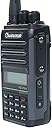
The Wouxun KG-S74A is a compact, IP67 waterproof VHF aviation radio delivering up to 6W RF output and crystal-clear reception via a superheterodyne receiver. It covers 118-137 MHz AM frequencies with 400 memory channels and NOAA weather alerts. Designed for pilots, it features a backlit LCD, programmable keys, built-in flashlight, and a long-lasting 2000mAh battery offering up to 26 hours of use. USB-C charging ensures quick power-ups, making it an essential, durable communication tool for reliable ground-to-air connectivity.
| ASIN | B0CDP1BMPQ |
| Additional Features | Weather Alert |
| Battery Average Life | 26 Hours |
| Best Sellers Rank | #629 in Portable FRS Two-Way Radios |
| Brand | Wouxun |
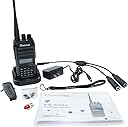
| Built-In Media | a removable antenna, belt clip, hand strap, Li-ion battery pack, rapid charger, AC adapter, owner's manual, and a one-year manufacturer warranty from Wouxun |
| Color | black |
| Compatible Devices | [VARIOUS] aviation devices operating within 118-137 MHz AM frequencies |
| Connectivity Protocol | USB |
| Customer Reviews | 3.8 out of 5 stars 39 Reviews |
| Frequency Range | 118-137 MHz |
| Manufacturer | Quanzhou Wouxun Electronics Co., Ltd |
| Mfr Part Number | KG-S74A |
| Model Number | KG-S74A |
| Number of Batteries | 1 Lithium Ion batteries required. (included) |
| Number of Channels | 400 |
| Special Feature | Weather Alert |
| Tuner Type | VHF |
| Unit Count | 1.0 Count |
| Voltage | 3.7 Volts |
| Warranty Description | 1 YEAR |
| Water Resistance Level | Waterproof |
| Waterproof Rating | IP67 |
G**E
Nice inexpensive air-to-air radio
For the low price this costs, I was concerned it would not be a good radio, but I was pleasantly surprised. Once you get past the confusing manner in which you program the channels and frequencies (they could do MUCH better with their manual) it actually is a very nice radio. The range is quite impressive, and I radio checked it with aircraft miles away, and it all came back 5 by 5. It has only a couple of extra features like a flashlight (?) mode and a timer... but none of the extra stuff like VOR nav that you see in far more expensive radios. If you want an air-to-air only unit, this is it. I highly recommend it.
B**N
Not a good choice if you’re a CFI
Receives traffic ok but very limited transmit function. Not good enough to trust the radio for your link to your solo student in the pattern after signing them off as a CFI.
C**S
This radio is wild
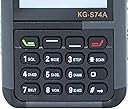
I came from having a Bendix King KX-99 brick of a radio. In contrast to another reviewer, it took all of 5 minutes of reading the manual to learn ALL the buttons, aside from the PTT, are programmable. I was able to even customize the welcome message which is super corny but a nice to have. Yes, the squelch buttons from factory is set up pretty uselessly as its the top red button and only allows you to go up, but I programmed the two side button short presses to command squelch and the long presses for something else then the red button long press for guard. For the price this thing is great, my only suggestion is to do better to remove the side panel for the headset adapter. Gotta find some thumb screws for that one. Seriously, dock and usb-c charging, and it comes with an adapter for a headset….. Game changer. I’m gonna follow up with an update for its battery life soon, but from what I can see I expect good things. Update after one month: Haven’t had to charge it, battery life is pretty sweet. I use it all the time with students to listen in on comms and to get weather without cranking up the plane. It just does the business. I love that I can save frequencies and name them whatever I want. If you’re an instructor or a private pilot, the size is great for flight bags and simply put the radio can compete with pretty much any aviation transceiver out there. Sure you need an adapter for the headset plugs, but honestly comparing it to the sporty’s pj2 or iCom radios, it’s a fair trade in my eyes. 1 year update after original post in June 2024: Radio holds up great. Battery life is as good as I thought it would be when I purchased. Have already used it to get clearances, ATIS, and even during a 7600 situation. I have already recommended this product to colleagues and friends. Compared to Sportys Pj2, it's objectively a better radio. The USB-C charging functionality is incredibly convenient and I've probably charged the thing maybe thrice since owning it.
D**L
Does not come with headset!!!!!! as seen in Photo
The stock photo shows a headset and even the enclosed booklet states that an headphone is enclosed but that is not true and I feel sad.
L**D
I am not a pilot. I bought this radio to listen to airband radio traffic.
I am in a metropolitan area with a major airport and a number of small airports all within 8-10NM. I am basically using the as a scanner. It works great for me. I have given only 4 stars because I have not (and will likely never) transmit so I can't address that functionality. The radio comes with everything one would need: a charging cradle and power supply (though the radio has a USB-C port for direct charging), belt clip, BNC adapter for different antenna connectivity, a headphone/mic adaptor (though I am using only the headphone side). Some other niceties as well like a rubber seal to replace the USB-C port cover making access to the charging port easier (though you then sacrifice the IP67 spec). It's my first handheld radio and IMO this thing seems solid. The button action and feel is great. As a beginner I like the audio feedback with button entry though both the beeps and voice guide can be turned off. The radio is highly configurable including the ability to assign pretty much any function to three of the buttons. Each of the three can be configured to two differnt functions, one for short press and one for long press. So there are 6 programmable actions. This configuring is easily done and well described in the User Guide. The stock antenna seems fine but I have not tried others. I mapped frequencies to channels by hand. It was a little tedious but straightforward. The User Guide is very complete and reasonably clear though there was some trial and error involved for me. The radio is pretty new and not (yet) supported by CHIRP. I did not try Wouxun's own radio programming support and did not even buy a programming cable. Looks to me like it will take some more research on my part to understand the nuances of programming support (both hardware and software) for this class of radio so I've avoided it for now. I am not a power user. I am defintiely happy with this choice. There are cheaper solutions for airband support and way more expensive ones as well. The cheaper radios that support airband seem to be GMRS radios in which the VHF AM support is some kind of and-also feature. But I wanted a radio that was specific for airband thinking (hoping) that I'd have a better chance of getting a device that works more reliably. FWIW, from someone new to this, I would definitely recommend this radio.
D**E
Great Radio!
In addition to being a private pilot, I'm also a HAM and GMRS-licensed. I have several similar HTs (Baofeng, Wouxun, and TIDRadio) so I thought this would be something to check out. I bought the KG-S74A and, at first, thought it would work out great as an emergency backup radio. Unfortunately, it had one serious drawback in that the squelch is accessed through the menus and takes effect only upon exiting the menu item. Fellow pilots will know that primary functions such as squelch need to be easily accessed while flying, especially considering that HTs are typically used in an emergency situation from failed avionics. If not for that, I would have kept it. Instead, I returned it and bought an ICOM IC-A16B which has two side-buttons for squelch up/down. This seems like an easy software fix and I sincerely hope Wouxun takes feedback and fixes this. I am rooting for them! Update: The software has been updated to allow assigning the side buttons to directly increase and decrease the squelch. Previously, they could only bring up the menu item. 5 stars now!
J**S
This radio is not compatible with Lightspeed aviation headsets
Yes, it comes with the aviation dual-plug headset adapter. No this radio--no mater what aviation adapter you use--will not work with lightspeed aviation headsets. Because of the reviews which said this radio did not come with an aviation headset adapter, I ended up ordering a third-party adapter when I ordered this radio. (I suspect there was a batch where the manufacturer neglected to add the adapter, but as of my review, that is no longer the case.) I tried to use this radio unsuccessfully with Lightspeed aviation headsets. The RADIO is not compatible. No, it is not the adapters. Both adapters work fine with other radios with the ubiquitous Kenwood headset plugs paired with a Lightspeed headset. But there is something with the military style microphone plug that Lightspeed uniquely chooses to use on their aviation headsets that does not sit well with this radio. Otherwise, I am very pleased with this radio. It CAN be programmed with a standard USB to Kenwood programming cable, IF you can find the radio-specific programming software to download. The software is not available from the Wouxun website, you will need to take a chance with downloading the programming software from a third-party site. (I wish you the best of luck finding a safe source for that download like I did after an extensive web search.)
D**N
Great little Radio with almost too many options!
Great radio with great reception and easy to use once it is set up to your liking. Every button has functions or options that can be assigned. Trying to assign functions/options to the buttons using the keypad on the radio can be frustrating. To set it up without a lot of frustration, you will need to get the downloadable programmable software and the USB cable adapter PCO-001 from “buytwowayradios.com”. If using Windows 10, you might also need to download the driver for the cable. If so, go to the cable page and select the downloads tab and download the PCO-001-Driver file. Installation of both on your Windows PC is quite simple if you have a little experience with Windows. Use the program software to configure all the buttons, enter frequencies and assign names to all of your selected channels and then send (write) them to the radio. Buytwowayradios also has great customer service to help you through this process if needed.
Trustpilot
4 days ago
2 months ago