Buy anything from 5,000+ international stores. One checkout price. No surprise fees. Join 2M+ shoppers on Desertcart.
Desertcart purchases this item on your behalf and handles shipping, customs, and support to Grenada.
🎮 Lightweight power, endless play — own your game anywhere!
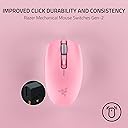
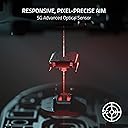
The Razer Orochi V2 is an ultra-lightweight, ambidextrous wireless gaming mouse featuring dual wireless modes (Bluetooth and HyperSpeed), an advanced 5G 18,000 DPI optical sensor, and durable 2nd generation mechanical switches rated for 60 million clicks. Designed for professionals and gamers on the move, it offers an industry-leading battery life of up to 950 hours on Bluetooth and 425 hours on HyperSpeed Wireless, powered by a single AA or AAA battery for optimal balance and convenience.


| ASIN | B0BFJSFS7V |
| Additional Features | 5G Advanced 18K DPI Optical Sensor, Lightweight, Mechanical Mouse Switches, Up to 950 Hr Battery Life, Wireless |
| Antenna Location | Gaming |
| Are Batteries Included | No |
| Are Batteries Required | Yes |
| Battery Average Life | 425 Hours |
| Best Sellers Rank | #245 in Video Games ( See Top 100 in Video Games ) #19 in PC Gaming Mice |
| Brand | Razer |
| Built-In Media | Gaming Mice |
| Button Quantity | 8 |
| Color | Quartz Pink |
| Compatible Devices | Mac, Personal Computer |
| Connectivity Technology | Bluetooth, USB |
| Customer Reviews | 4.4 out of 5 stars 5,380 Reviews |
| Enclosure Material | Quartz |
| Hand Orientation | Ambidextrous |
| Hardware Platform | Mac, PC |
| Item Dimensions L x W | 2.46"L x 4.25"W |
| Item Type Name | Gaming Mice |
| Item Weight | 0.18 Pounds |
| Manufacturer | Razer |
| Mfr Part Number | RZ01-03731200-R3U1 |
| Minimum Required Operating System Version | Windows 10 |
| Model Name | Orochi V2 |
| Model Number | RZ01-03731200-R3U1 |
| Mouse Maximum Sensitivity | 18000 Dots per Inch |
| Movement Detection | Optical |
| Movement Detection Technology | Optical |
| Number of Batteries | 1 Lithium Metal batteries required. |
| Number of Buttons | 8 |
| Operating System | Windows, macOS |
| Power Source | Battery Powered |
| Range | 10.0 meters |
| Special Feature | 5G Advanced 18K DPI Optical Sensor, Lightweight, Mechanical Mouse Switches, Up to 950 Hr Battery Life, Wireless Special Feature 5G Advanced 18K DPI Optical Sensor, Lightweight, Mechanical Mouse Switches, Up to 950 Hr Battery Life, Wireless See more |
| Style Name | Modern |
| UPC | 840272904596 |
| Unit Count | 1.0 Count |
| Warranty Description | 2 year manufacturer |
B**V
Fantastic for gaming and productivity, but missing USB-C rechargeability
I recently purchased the Razer Orochi V2, and overall, it is an amazing mouse. The build quality is absolutely fantastic, and it feels premium. It fits perfectly in my palm, and the materials and clicks have a very pleasant tactile feel. I use it daily for both gaming and work, and it performs flawlessly in both scenarios. Compared to my Razer Pro Click, the Orochi V2 actually fits my hand much better. In fact, I now only use the Pro Click as a backup for when the Orochi's battery suddenly dies! There is really only one downside for me: it runs on disposable batteries rather than having a built-in rechargeable one. On the plus side, it only needs a single battery to operate, and I love the clever design that allows you to use either a standard AA or a smaller AAA battery depending on your weight preference. However, I would really love to see a future version of this exact mouse with a built-in battery and a standard USB Type-C charging port. If you don't mind swapping batteries occasionally, this is a near-perfect mouse. Highly recommended!
G**I
Amazing mouse even for big hands.
So I have big hands and what any big hand gamer understands is that you either have to get a big ol heavy G502 size mouse or use a certain grip to hold all these mice for smaller handed people. I previously owned a Model O, G pro, and Model O wireless. Having big hands my biggest peeve with all the other mice is that they’re ambidextrous mice so they are even harder to hold with fingertip/claw grips because the smooth, near flat, symmetrical sides. I only really make contact with the sides by pinching my fingers with them. I never make contact with the butt or base of the mouse with my grip. There’s where the Orochi changes things The Orochi somehow is a smaller mouse than all of the above but fills out my hand and grip SO much better. The sides actually have slight grooves so I don’t slip off the sides of my mouse and the shorter but bigger hump in the middle makes me for once actually feel the mouse in my palm if I want. Overall the feel is amazing. Battery life varies of course but I can barely tell there’s a battery in the thing even when flicking and the weight and balance of it feel so good. Mobile gaming is the main reason I got this mouse. I like that the dongle stores inside the mouse, uses batteries so I don’t have to worry about keeping it charged or bringing around extra cables to charge it, and the Bluetooth is good for casual gaming but doesn’t do great with big flicks so the 2.4ghz connection is required for esports games. Overall a great mouse and really awesome to game with and a little plus to it is that the shell comes off the back so satisfying, it’s hard to not fidget with it by taking it on and off haha. Well worth the money and I’d expect they’ll make a rechargeable one with all the success this mouse has accrued so far so if the swappable batteries don’t tickle your pickle, I’d just buy a sub $20 rechargeable battery station or just wait for a new rechargeable Orochi to come out.
A**N
Great Quality Little Gaming Mouse
Great little gaming mouse for my laptop. 2 wireless modes is great and the fact that you can use either a AA or AAA battery to power it, is really convenient and cool. I got a great deal on this mouse as it was on sale for 25$ but I don't think I would spend 60$ on it. It's a little short for my hand so clicking is a little awkward but you can expect that for a compact mouse and I have huge hands. Overall though it performs very well, love all of the settings as well. I am an avid Razer customer. I love their stuff and always have.
M**A
Great quick mouse <3
Very nice mouse though the scroll wheel is a little hard but it doesn’t skip around or behave oddly. instant set up and very comfy! I’m a girl with small hands so it fit perfectly! not too big or uncomfy, I can naturally grip it and the color is so perfect for my pastel blue and white setup! The click is a bit loud but not annoyingly loud, feels very sturdy despite it being so light, I’d say it’s a good price for a gaming mouse! (no connection issues either with Mac) I don’t have a mouse pad and it actually glides pretty good on my wooden desk.
D**9
So light and so smooth
It is ridiculous how good and light this mouse is for the price. Got it on sale($40) and it was very much worth every penny. Love using it for work and for gaming.
E**G
Best mouse I've had in a long time!
I am on my computer often (hours a day for work and play). I gamed for decades and always had the best mice. But, the last year few years I haven't gamed much and had been using something not so great. I play a game here or there again and decided I wanted something great again. I want a mouse that will last many years (something that you have to put batteries into / not rechargeable), that is fairly small and light (which I've always preferred), has no fancy lights, long battery life, responsive & accurate, and good quality / feel. This clicks all the boxes! It allows you to use a AA or a AAA; only one at a time, do not insert both. The AAA option is for the lightest weight. I admit I haven't used that option. I want the longevity of the AA over the AAA (usually rechargeable AAA's are under 1000mah, and AA's are over 2000mah - so you get 2 to 3 times more battery life with the AA). I use rechargeable batteries in everything; however, the first battery I used in this mouse is an Energizer lithium. I want to see how long it lasts with a normal high quality battery (so far, 30 days with ~7 hours of computer use a day. I never turn the mouse off, it is always switched to 2.4 and turned on when I am away from computer). With the AA the feel and balance is great. One of best feeling mice I have used. Has plenty of buttons for my uses. Extreme gamers may want more. I barely use the few extra it has. The buttons all feel good and sturdy. They should last, I hope. It looks classy, I have the white color. I like that is has both bluetooth and 2.4 modes. The 2.4 mode will give you the best performance. However, it will also cut the battery life! The bluetooth mode will give you a ton more battery life; however, you will lack some performance. I have not tested bluetooth mode at all yet, I wanted to test the mouse fully with this first battery before doing that. In the future, I may switch between bluetooth mode and 2.4 mode when I switch from normal computing to gaming. I only game say, 1 out of 7 hours I am on the computer. So, that is a potential benefit. I also like it has the bluetooth in case I want to take it anywhere for work computing, with a laptop or tablet. Then, I can leave the 2.4 usb card in my desktop at home, and still have a great mouse for on the go. When I bring it home, it's all ready again. Overall I am very happy with it after having it for a month now and using it daily. I hope it lasts for years. *Update. My mouse battery finally died for the first time on March 27, 2022. It was working perfect, then suddenly the cursor stopped moving. It lasted about 2.5 months with an Energizer Lithium (2.4ghz whole time, mouse never turned off). Not bad! I assume a good rechargeable (Eneloop) will give me at least 2 months (and with rechargeable batteries, I will just replace every 2 months (maybe even every month), just so I know my mouse will never stop working when I need it)).
S**T
Just a great mouse that happens to be a little smaller. It’s adorable. I love it!
This is the perfect travel mouse and office mouse! It is not as small as others make it out to be at least as far as feel in the hand. I have a Logitech G502 and a Razer Basilisk and I feel that the Orochi is still very comfortable in my hands (though I have smaller hands). I love that the Orochi does not have RGB, making it a perfect stealth office mouse. I have considered even replacing my G502 as I tend to prefer the texture of Razer’s plastic. Hopefully in the V3 they can add left and right tilt scrolling into the scroll wheel! I’d buy it in a heartbeat.
A**R
Very glitchy mouse won't accept clicks, made me reinstall windows
TLDR: Ask ChatGPT about this mouse and it'll tell you that other users have reported issues with this mouse not clicking properly. It will tell you that this is a known issue with this mouse. So I'm an IT expert (programmer, been using PC's since Windows 3.1). And I could not get this mouse to work right. The mouse doesn't work right when the computer goes to sleep, and then wakes from sleep. This problem occurs on Windows 11 pro. When the mouse is connected in Bluetooth mode: First problem is, the mouse will NOT reconnect to the PC when the PC wakes from sleep, unless you have "Show notifications to connect using Swift Pair" disabled in windows Bluetooth settings. But setting is on by default. Second problem is, even with this setting disabled, and even if the mouse successfully reconnects when the computer wakes up, the computer will NOT accept clicks when it wakes up. This mouse apparently drops a phantom click that it never releases. The only way I could find to get rid of that phantom click is by pressing CTRL+ALT+DEL every time the computer wakes. This resets the phantom click and the mouse would function normally. But it's super annoying to have to press CTRL+ALT+DEL every time the PC wakes, especially since this mouse is supposed to be a gift to my little girl, I don't want her to have to deal with it not working perfectly. Also the mouse would sometimes stop accepting clicks even in the middle of playing games, but this only happened rarely in Bluetooth mode. On the wireless USB mode: The mouse cursor is NOT visible when windows first boots. You can't use the mouse to get to the box to type your PIN number to unlock the computer. You must use the keyword to get into windows, and then the cursor appears. This problem doesn't happen when using the mouse in Bluetooth mode, only in the wireless USB mode. And then the phantom click issue is MUCH more frequent in the wireless USB mode, and doesn't require the computer to wake from sleep, but happens randomly even in the middle of playing games... suddenly you can't click anything. And when waking from sleep, or when the mouse "goes to sleep", when it wakes up there's issues with clicks... and sometimes the cursor isn't even visible. Connecting a second mouse: When the computer stops accepting clicks, then even the second mouse would not be able to click. All connected mouses would stop being able to click. But this problem of not being able to click, would ONLY occur if the Razor Orochi V2 mouse was connected to the computer either via Bluetooth or wireless USB. If I disconnected the Orochi V2 mouse, then the problem never happens. So it's definitely this mouses's fault. But initially I didn't realize this mouse was the culprit. Because it affected all connected mice. So I thought, at first, that it was a windows issue... maybe a bad driver I had installed in the past. So I ended up reinstalling windows, trying to fix any potential driver issues. It wasn't until after that, when I discovered that the problem was this mouse all along. I was super upset to have reinstalled windows, and lost all my software and settings, only to then discover that the problem was still there and it was this mouse all along. As for getting my money back, amazon did not offer me an option to return the mouse and get a replacement. It only lets me send it back for a full refund. No option for replacement. So I think I bought this mouse when it was on sale. So it seems like they are expecting me to send it back, and then repurchase it at the new higher price, if I want to try it again. It's possible mine was simply defective. I did every imaginable thing to try to get this mouse to work. The mouse I had was brand new from Razor, but it was running an old firmware. I did a firmware update to version 1.03.00 (it was running version 1.02.00 when it arrived). I can confirm that firmware update did NOT fix the problem with the phantom clicks. I also set all the related devices in my device manager to not go to sleep, including the USB slots. That did NOT fix the problem with the phantom clicks. I also, at the advice of chatGPT, did a bunch of registry edits, none of which fixed the problem. I also, at the advice of chatGPT, wrote my own c# application, which attempted in various ways to force the mouse to release the phantom click, at least when the computer would wake up. I was trying to mimic the behavior of pressing CTRL+ALT+DEL. After many hours of coding, I was unable to programmatically correct the problems with this mouse. I really wanted this mouse to work because it's wireless, and its small, so it fits my daughter's hand. I'm now having to return this mouse at my time and expense, no option for replacement, lost whatever discount I got from the previous sale, and I lost days of my life trying to fix this mouse, and I lost some of my software and settings from the reinstallation of windows, so I have work to do just to get my daughter's computer back to normal again. Terrible experience. Conclusion: Ask ChatGPT about this mouse and it'll tell you that other users have reported issues with this mouse not clicking properly. It will tell you that this is a known issue with this mouse.
V**N
Razer Orichi
Good mouse for use with MacBook Pro. Daughter loves it.
S**Y
Su diseño adecuado y durabilidad en su batería excelente
Funcional suave manejo y excelente calidad
K**A
Es precioso me encanta
Lo compré hace ya tiempo, es demasiado lindo me encanta porque tiene dos compartimentos para pilas una doble a y otra triple a, ojo solo puedes meter una a la vez
R**P
Perfect 👍
Great mouse, nice clicky mouse, additional keys are a must have. Once you start using it then can't work without it
F**D
After 2 Years — Still an Amazing Mouse!
I’ve been using the Razer Orochi V2 for over two years, and it’s honestly one of the best lightweight wireless mice I’ve ever owned. The battery life is ok.. . It’s comfortable, compact, and easy to carry, especially for travel or laptop setups. Even after all this time, it still looks great and performs flawlessly. Truly worth every riyal — a long-lasting, reliable mouse! 🖱️💪
Trustpilot
2 weeks ago
2 months ago