Buy anything from 5,000+ international stores. One checkout price. No surprise fees. Join 2M+ shoppers on Desertcart.
Desertcart purchases this item on your behalf and handles shipping, customs, and support to Grenada.
🎯 Master your media universe with one sleek remote!
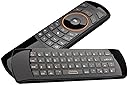
The Rii Mini i25 is a multifunctional 3-in-1 wireless device combining a mini QWERTY keyboard, fly mouse, and IR remote control. Operating on a reliable 2.4GHz wireless connection, it supports PC, laptops, Android TV boxes, Linux, Windows, and IPTV systems. Featuring a rechargeable lithium-ion battery, programmable IR keys, and a compact design, it’s engineered for seamless media navigation and productivity, making it an essential gadget for tech-savvy professionals seeking streamlined control.


| ASIN | B06XHF7DNQ |
| Antenna Location | Gaming |
| Are Batteries Required | Yes |
| Best Sellers Rank | #244 in Computer Keyboard & Mouse Combos |
| Brand | Rii |
| Color | Black |
| Compatible Devices | Gaming Console, Personal Computer, Television |
| Compatible Operating System Family | Android, Windows |
| Connectivity Technology | Usb |
| Customer Reviews | 3.9 out of 5 stars 1,830 Reviews |
| Hand Orientation | Ambidextrous |
| Item Weight | 0.09 Pounds |
| Keyboard Description | Indoor |
| Keyboard Layout | QWERTY |
| Manufacturer | Riitek |
| Mfr Part Number | 8541649159 |
| Minimum Required Operating System Version | Android 1.0 |
| Model Number | 8541649159 |
| Number of Batteries | 1 Lithium Ion batteries required. (included) |
| Number of Keys | 92 |
| Operating System | Android |
| Other Special Features of the Product | Rechargeable |
| Power Source | Battery Powered |
| Special Feature | Rechargeable |
| Unit Count | 1.0 Count |
M**K
Awesome remote, does everything you need in 1 remote
I love this little remote. Im coming from using kodi with a Bluetooth keyboard and this is next level. I got stumped and thought there was a problem because when flipping the remote the underside buttons shutoff to prevent accidental pressing. I didn't know this and hold the remote naturally upside down sometimes and it would stop working. Just be aware it has that feature. I think its great being able to flip and use whatever side you want. The air mouse is alittle glitchy but I have no use for it so I just disable it. It has auto standby like most rii remotes. So I rarely turn it on or off. Charge lasts quite a while without shutting it off, weeks for me. Ir learn function works perfectly although I would love more buttons to program. I plan on getting a few more.
B**N
Wii remote + TV Remote
The remote came out the box with a charge and it was basically plug and play into my pc. I tested the mouse feature and it is basically what a wii remote is in how it functions. Their aren't as many programmable buttons at the top as I would like; the ones above the circle "ok" are programmable with my tv remote. For those that don't understand the instructions on how to program the buttons; first you need this remote and your current tv remote. Then, turn on the remote with the switch on the side and hold down one of the orange programmable buttons (which their are only 5), after holding it down for a bit, the blue light on the remote will have a red/purple light turn on next to it, then take your current remote and point it towards the receiver of this remote and press the button on your remote that you want this remote to mimic. You will know if it was successful if you see the red light flash for a second and then disappear. So if you want it to mimic the power button on your remote, press the power button on your current remote pointing the receivers at each other and it will now take on that function. I do like the color with the accent orange but it does not have a backlight in any of the buttons. So, if you are trying to use it in the dark to say turn on your tv, then it will take some memorizing or turning the light on. I really wish that their were like an extra 2 buttons that are programmable. Currently I would like to have the ability to go up, down, left, right on my tv with this remote, but sadly their are only 2 arrows. The left click for the pc is the "OK" in the middle circle, and the right click is the back arrow below that above the mouse activator button. Another gripe I have is that their is no windows button or something of the sort. There are 2 "alt" buttons which I believe do the same thing, with one having a "www" secondary function and the other one having the tilde key secondary. I would rather press w 3 times rather that have a dedicated key for it, and that button can be replaced with the windows key or a button like the windows key for any non-windows users. For my needs, I have tested it to work at least up to 10 ft without connectivity issues although it probably can work further, I have not tested longer distances. The build quality of the remote is quite sturdy,, it passes the bend test like what JerryRigEverything does on phones. It is pretty rigid in construction and is probably a teeny bit bigger than a modern tv remote. It is a downside that it is micro-B cable to charge it when we are progressing over to usb-c everything. but that might be a future upgrade that will take place. All around a pretty good buy for $20, its a good mouse/keyboard/remote combo, that is effective at its job and is arguably better than any mini portable touchpad/keyboard combo.
J**K
A well thought out remote control
I originally bought it just for its IR receiver, so I can program my universal remote to control my HTPC. It does not work. The IR specs are incompatible. I decided to use it by itself. You can tell it's a quality product: * Build quality is great, and I like the no-nonsense feel of the button clicks. * The mouse works very well. It's very accurate and responsive, and I feel comfortable using it for point and click activities. It's way better than other remotes I have used so far. * The keyboard is just the right size and very responsive. Combined with the mouse I have actually used it to edit some config files in a pinch. * Pleasantly surprised it came with backlit buttons, and they work. * Overall feels like they have put in a lot of design into this remote. A lot of thoughts have gone into how to make this remote as functional as possible. They refrained from adding fancy features that do not improve usability, and I appreciate it. A few negatives: * Missing a few important buttons on remote side (stop and exit buttons for Kodi) * Backlit feature uses gravity to determine which side should light up. This actually does not work so well in practice while in bed. Maybe just light up both sides? * Programming it is difficult, and it only has a few buttons that can be programmed.
J**.
Works well with Kodi with some tweaks but could use some improvements
I bought this to use with Kodi and nextPVR installed on my HTPC. The Top 5 orange buttons are programmable IR buttons, they learn the codes of an existing controller you have. No way as far as I can tell to program them manually, so if you don’t have the original remote you want to copy, you are out of luck. I programmed them to turn on and off my Sony Bravia TV, as well as change the input and volume. While this works, the RII remote IR blaster is significantly weaker than the original Sony remote. I have trouble from 12 feet away using it, have to reach way out and press multiple times. Seems to work OK from about half that distance, so I will usually turn on the TV, change the input, and adjust the volume before going to go sit down. Otherwise, I’ll just use the original remote. These are the other 2.4 Ghz buttons that communicate with the PC on the front of the remote: Direction wheel: same as keyboard direction arrows OK button, left mouse click (if air mouse is turned on) or keyboard enter key (if air mouse is off) PgUp/PgDn: same as Page Up/Down keys on keyboard App list: same as app list on keyboard (key usually to left of right control key, looks like arrow pointing to menu list) Power button: same as sleep button on computer or keyboard Remaining 9 buttons are standard keyboard multimedia buttons: APPCOMMAND_BROWSER_BACKWARD = 1 (or right click if air mouse turned on) APPCOMMAND_BROWSER_SEARCH = 5 APPCOMMAND_BROWSER_HOME = 7 APPCOMMAND_VOLUME_MUTE = 8 APPCOMMAND_VOLUME_DOWN = 9 APPCOMMAND_VOLUME_UP = 10 APPCOMMAND_MEDIA_NEXTTRACK = 11 APPCOMMAND_MEDIA_PREVIOUSTRACK = 12 APPCOMMAND_MEDIA_PLAY_PAUSE = 14 In Kodi when watching a recording the next track button does nothing, and the previous track starts the video from the beginning. I would rather have those buttons fast forward and rewind in Kodi, below is what I did to get that to work: Use the Kodi Keymap Editor Add-on (installed from repository): Settings->Add-ons->Program add-ons->Keymap Editor->Run->Edit->Global->Playback->Fast Forward/Rewind->Edit Key (then press the RII remoter next/previous track key to map) Cancel back to main Keymap Editor window then click Save or edit (or create) the below file: %APPDATA%\Kodi\userdata\gen.xml <keymap><global><keyboard><key id="53259">fastforward</key><key id="53260">rewind</key></keyboard></global></keymap> The home button launches the default web browser, and the search button brings up the Windows search box. I wanted the home button to launch Kodi, and the search button to launch Google chrome. Below are the registry changes I made on Windows to make that work: To change the multimedia Home button to launch Kodi vice open default Web browser, add/edit below registry key: [HKEY_LOCAL_MACHINE\SOFTWARE\Microsoft\Windows\CurrentVersion\Explorer\AppKey\7] Name Type Data ShellExecute REG_SZ "C:\Program Files\Kodi\Kodi.exe" To change the multimedia Search button to launch Google Chrome vice open Windows search box, add/edit below registry key: [HKEY_LOCAL_MACHINE\SOFTWARE\Microsoft\Windows\CurrentVersion\Explorer\AppKey\5] Name Type Data ShellExecute REG_SZ "C:\Program Files (x86)\Google\Chrome\Application\chrome.exe" Also, if I accidently pressed the sleep button it would cause problems in Kodi. I couldn’t find any way to use that key for something else, so I disabled it: To disable the sleep button on the controller: Control Panel->Power Options->Choose what the power buttons do->When I press the sleep button->Do nothing As far as the remote itself, it seems to work well. There is no backlight (one of the few reviews with pics clearly shows it having a backlight). The thing I don’t like the most about the remote is that it goes to sleep after 2 minutes. This is extremely annoying since you have to press a button to wake it up, then press the button again to get it to do something. I have a Logitech wireless keyboard and mouse, and I keep them on all the time. The batteries in the keyboard last for several years and the ones in the mouse several months. Maybe they could just make the mouse go to sleep, and if you press a key wake up then actually send the keystroke. Would be nice if you could change the sleep timeout or even disable it. Also, would have been nice if they included software to reprogram the buttons, that way you don’t have to worry about trying to figure out a way to do it in an app or edit the registry. Pros: - Can do everything you need to operate Kodi including turning on the TV - Rechargeable batteries and included USB cable Cons: - No software to customize what buttons do - Annoying sleep timer - No backlight - Weak IR transmitter
W**M
Don’t waste your money
From the description you would think this is the best remote ever. Here are the reasons it is the worst remote ever. After hours of attempting to program the remote to even the most basic tv functions the best it could do was turn on and off the tv. It works poorly as a pc remote. It won’t work for firetv. It is supposed to work great with android tv boxes. Who knows if that is accurate. Worst part if you program 1 button and it was the wrong button you cannot reset the remote. It would be awesome if they had thought the remote has a usb charger why don’t we offer software presets for common devices or made it Bluetooth without a dongle so it would work on more devices. I am no noob to programming tv vcr dvd and fire remotes also using pc devices so when I say this is not worth $1 let alone $18 that’s a fact. It really needs to be universal Bluetooth not IR and most IR remotes take a code to match a TV not try to program each button this product is a horrible fail with bad directions most of the try’s to set the power button failed I think it managed to take after 50 try’s and lots of unhelpful videos on YouTube it just does not work as designed. I want my money back. I bought 3 and might keep 1
M**N
Stop shopping around, this is the one you want! Trust me, I've had many.
I have owned 3 air mice over the last 3 years. I basically get the highest rated one each year. So I do have something to compare it to. This year I decided I wanted the backlit keyboard because I watch a lot of TV in the dark. I have tried it on both my HTPC running Windows 10 and Android TV box. It worked flawlessly out of the box on both systems. It is by far the best air mouse I've ever used. It works absolutely perfect. I can't believe something that adds this much functionality is such an inexpensive device. Don't underestimate the backlit feature. It is awesome. I was constantly holding my old remotes up to my phone to get a little light when watching TV in bed. It is something that got rather annoying. This air mouse is perfect. Period. I wouldn't change one thing about it. Quality is actually very high for being so cheap. It looks great especially in the dark when it's lit up. Super easy to use. Super easy to setup. If you are joining the cord cutting movement and use Kodi in bed this is what you want. Trust me I've had many. Others steer away from this one because it isn't rechargable but from my experience those aren't as good. All of the money is put in to the quality of the remote instead of wasted on an internal lithium ion battery. My first air mouse had an internal battery and it lost it's capacity and I was stuck having to keep it plugged into a charger if I wanted to use it. This one will last much longer BECAUSE you can change the batteries. And it seems to be higher quality overall. If you are looking for an air mouse this is the one you want, trust me!.... I would buy again. I would recommend to friends and family. And if my opinion changes I will update this review. But as it stands this is the single best air mouse by FAR!
J**R
Best remote ever
I tried some other similar "air mouse" remotes with keyboards, and this one is by far the best. It's not perfect, but it does 95% of what a full keyboard and mouse can do, the battery lasts forever, and it's so easy to use, I can hand it to houseguests with almost no explanation and they figure out how it works. Here are the few small things I wish worked better: - Missing functions: There is no "Windows" button, no scroll-wheel equivalent, and you can't "Ctrl-click" - No backlight. In a dark room, it's hard to see the button markings, especially the red "function" markings which you need to use numbers and some punctuation. - The IR blaster is not that strong. It can learn to control infrared remote devices like the TV, but you have to make sure it's pointed straight at the sensor, and even then sometimes it takes a couple of button presses Regardless, I would buy this again when this one dies, unless there is an updated model. I've had it about a year and a half, and it's working just as well now as when it was new.
K**H
Cool, but manage your expectations
This is a cheap air mouse. It works good for what it is. Personally, I recommend turning off "enhance pointer precision" in windows settings to make it feel more accurate. Keyboard is fine as long as you understand what you're getting. Rubber keys that are tiny. But for what they are they respond quite nicely. I had a Jornada back in the day so I'm used to little keyboards like this. The reason for deduction of one star is for the sensitivity of the mouse. Sure, you can adjust DPI on the device itself (keyboard shortcut) or adjust the pointer speed, but it cannot detect slow movements. Therefore, any time you move the device slowly to try and accurately click something small, it just won't move at all, you'll run out of room to move it, and you find yourself violently shaking it up and down trying to recenter the pointer. This one downfall is kind of sad, because the build quality is fantastic on this thing. It feels like a remote that would have been included in a fancy piece of HiFi equipment back in the day. I'm definitely keeping it as it serves my purposes, but man if it were a little more sensitive this would be a blast to play an RTS game on my living room television. PS: it DOES right-click. It's the button between VOL+ and PgUp that looks like an arrow doing a 180.
K**Y
Works great with Kodi
Unfortunately we couldn't figure out which was the right mouse button when in Air mouse mode
G**M
Great when used for a mini PC media centre
Works reasonably well with Kodi running on a mini PC used as a media centre. The IR part can be used to mimic some of the TV remote codes.
S**Y
Déception
Ne ce synchronise pas avec d’autres télécommandes.
M**D
تصميم
متنوع الخدمات
A**R
Good
Good
Trustpilot
2 days ago
3 weeks ago