Some deliveries may take a little longer than usual due to regional shipping conditions.
DOWNLOAD THE APP


Customer Services
Copyright © 2025 Desertcart Holdings Limited
DOWNLOAD THE APP


🚀 Upgrade your desktop WiFi game—because buffering is so last decade!
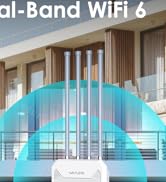
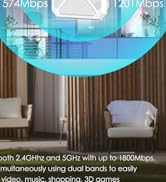
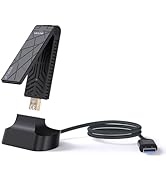
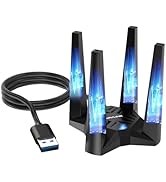
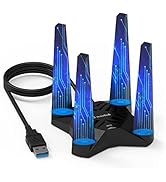
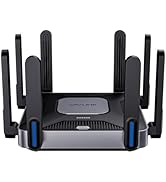
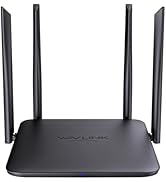
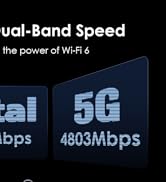
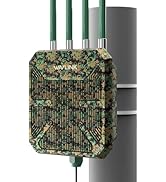
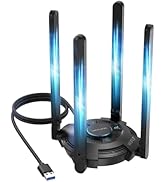
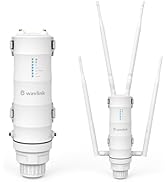
The WAVLINK AX1800 USB WiFi 6 Adapter delivers dual-band wireless speeds up to 1800Mbps with four high-gain antennas for superior coverage and stability. Designed exclusively for Windows 10/11, it features WPA3 encryption for enhanced security and supports MU-MIMO and OFDMA technologies for efficient multi-device connectivity. Its magnetic base and USB 3.0 interface ensure flexible placement and maximum throughput, making it the perfect upgrade for professionals demanding fast, reliable internet without the clutter of cables.









| ASIN | B094NB9RN6 |
| Best Sellers Rank | #38 in USB Computer Network Adapters |
| Customer Reviews | 4.2 4.2 out of 5 stars (1,363) |
| Date First Available | May 11, 2021 |
| Item Weight | 10.5 ounces |
| Item model number | WN693A5 |
| Manufacturer | Wirelessforce |
| Product Dimensions | 6.18 x 5.35 x 4.06 inches |
Y**E
Strong wifi
Excellent Wi-Fi adapter. Setup took just a few minutes, and it connected without any problems. The connection is fast and stable with no random drops. It significantly improved my device’s Wi-Fi performance and works exactly as advertised.
J**J
Best USB wifi adapter!
I have a Windows desktop PC that has had issues with Wifi since I purchased it. Its internal wifi never worked and other external USB adapters have always struggled with drivers, poor Wifi speeds, frequent disconnects and the need to reboot constantly. I noticed that this adapter claimed to be plug and play and did not need additional drivers. This is how Windows SHOULD work at this point but for some reason was not my experience with other Wifi adapters. It has a decent length cable so you can find the best spot and a magnetic base so you can stick it to the PC case or something else metal which may help strengthen the signal. Since plugging it in a week ago, I have not had one disconnect, no need to reboot and speeds are consistently about 250 down, even faster than an IPad in the same location. Buy this one! I am impressed.
C**E
Easy to get started.
Easy to install the drivers. Works great.
D**.
Windows 10 Install, So Far So Good With One Caveat - UPDATED X 2
First off... I sure hope the people giving this a bad review because it doesn't light up with flashing blue colors don't vote. haha Alright, so I've had this plugged in for a few hours... We live out in the sticks, so our only option for Internet was DSL. My PC is not a dinosaur, but it's old enough that it doesn't have a Wifi adapter. (It does have USB 3.0, at least lol). So my PC was connected to our router via ethernet, and the entire rest of the devices in the house connected to the router over Wifi. Well the other day we got T-Mobile home internet, and the only spot it got good cellular reception was downstairs and my PC is upstairs on the opposite side of the house. No way to run a long ethernet cable to it, so I had to find a Wifi option for my PC. After much reading, I settled on this one. I liked that it had 4 antennas, and a cable so it wasn't just something stuck right in the back of my PC. I liked that with the cable it had some flexibility to move it around and set it up on my desk. As the title states, I have Windows 10 and I can verify this thing is truly plug and play. I didn't disconnect my DSL, just plugged this thing into a free USB port and in no time when I clicked Networks on the task bar suddenly I could see our current Wifi and the T-mobile one. Suprisingly good signal from the T-mobile one, too... which as I said is downstairs on the other side of the house from me. I'm guessing 50 feet away through several walls and the floor. Clicked on the T-mobile Wifi, typed in the password, and it immediately joined and I suddenly had Wifi access on my PC. I was shocked how easy it was. I'm one of those people that always expects there to be a problem and something to go wrong. But no, it just worked immediately and connected immediately with no driver downloads or fiddling with settings. Now... in the title I said there's a caveat and there is. Using Speedtest.net, on my PC with this adapter I get slightly faster apparent download speeds than my iPhone 11 testing on the same server and right next to this adapter. But my upload speeds, for whatever reason, are noticeably slower and seem to consistently be so test after test. Testing on my iPhone I'll get, say, 38 Mbps down and 9 Mbps up. But on my PC with this adapter (once again, both here in the same room) I'll get 41 Mbps down but only like 3 or 4 Mbps up. For some reason I just can't get the same apparent upload speeds using this, and perhaps there's a technical reason or something a computer expert would understand... but that's above my paygrade. But honestly, I don't care. With our DSL I got 5 Mbps down and .6 Mbps up. Yes, *point* six up. So in my particular case, I'm thrilled even if I don't get the same upload performance as my phone seems to get. Just be aware if you're used to really fast upload speeds with other wi-fi devices, you may not get them with this adapter. So as I said, it's only been a few hours. I've restarted the PC several times just to make sure there's no issue with it re-connection on power up and there hasn't been. I'll update later as time goes on if anything changes, but if you never see me edit this review again then suffice it to say it's working and working well. I'm still in shock how easy this was on Windows 10, and I don't see why Windows 11 would be any different. UPDATE 9/12/21: After several weeks of this thing working flawlessly, I've suddenly developed the issue several other reviewers mentioned of constantly losing the connection. Every other Wi-Fi device is fine, so I know it's just this adapter. I was so happy with it that I've requested a replacement and I'll give it one more try, hopefully just got one with some faulty hardware that didn't hold up. UPDATE 9/15/22: Just received the replacement adapter, immediately plugged it in and I have a solid connection again that isn't dropping out every few minutes. Fingers crossed the other one was just a bad egg, because otherwise these things are really slick. Fast connection and super easy to set up. Will update again if either 1) this one starts dropping out, or 2) a good amount of time has gone by and it's continued to perform perfectly. UPDATE 2/8/2023: 5 months later, and it's worked almost flawlessly the entire team. Every so often upon booting up my computer, the adapter upon powering up will fail to connect to the wi-fi... but a quick unplug from the USB and back in and almost every time it immediately connects that second try. But this doesn't happen all that often, so I'm not worried about it. This adapter has been excellent for the price, utility, and ease of installation. Definitely recommend.
J**R
Terrific WiFi adapter. USB cable might be suspect.
This is a terrific WiFi adapter. It is currently operating on WiFi-6 with my PC at a much higher speed than my old WiFi adapter. I had one problem initially. The adapter was cutting in and out sometimes. I tried replacing the USB cable with one I already had, and it fixed that problem. I then tried the supplied cable again and the problem returned. I threw the USB cable that came with the adapter away and am happily operating very well with my replacement USB cable.
G**O
Not worth the price
I’m dropping this to one star I’ve had it for a while now and it disconnects quite a lot randomly I’ve tried everything to solve this it ended up being this and not my gaming oc also the speed isn’t very good it’s doable in a pinch but not the best I can fake or watch a movie but if I try to do both the amount of lag I get is astonishing not worth the price save you money but something else
A**N
It Works, But...
This product is exactly as described; however, it won't work for me; I have a new laptop and new ports, USB 3.2 Gen and Thunderbolt USB-C, and so forth; trying to find a replacement WiFi adapter to replace the Killer 7 WiFi adapter is an trial and error process; my laptop has all the latest technology standards which I am learning; this product works as stated, just not advanced for my laptop AND new Router 6 from my internet service provider. I have the i9-core motherboard and so you can see I need something more advanced..TJ
E**T
Works Great
Best antenna I've ever bought
R**T
Hello At First this was a great and economical usd wifi adapter. connection was fast and stable but to get these results I had to install it like a table, with antennas down (see picture). When installed as suggested, with the antennas up, I had a very unstable connection and speed was lower than my pc integrated wifi card After six months, I started having issues with spotty connection, contacted the seller, got some suggestions, applied them and all was ok for another 3 months. Now, this thing is completely useless, internet is slow and spotty. Manufacturer will not respond and could not get a re[;acement Why is it that new porducts do not last long enough to at least make the cost worthwhile Had same issues with Netgear
Trustpilot
1 month ago
1 week ago