Buy anything from 5,000+ international stores. One checkout price. No surprise fees. Join 2M+ shoppers on Desertcart.
Desertcart purchases this item on your behalf and handles shipping, customs, and support to Grenada.
🏷️ Label like a pro, wirelessly and effortlessly!
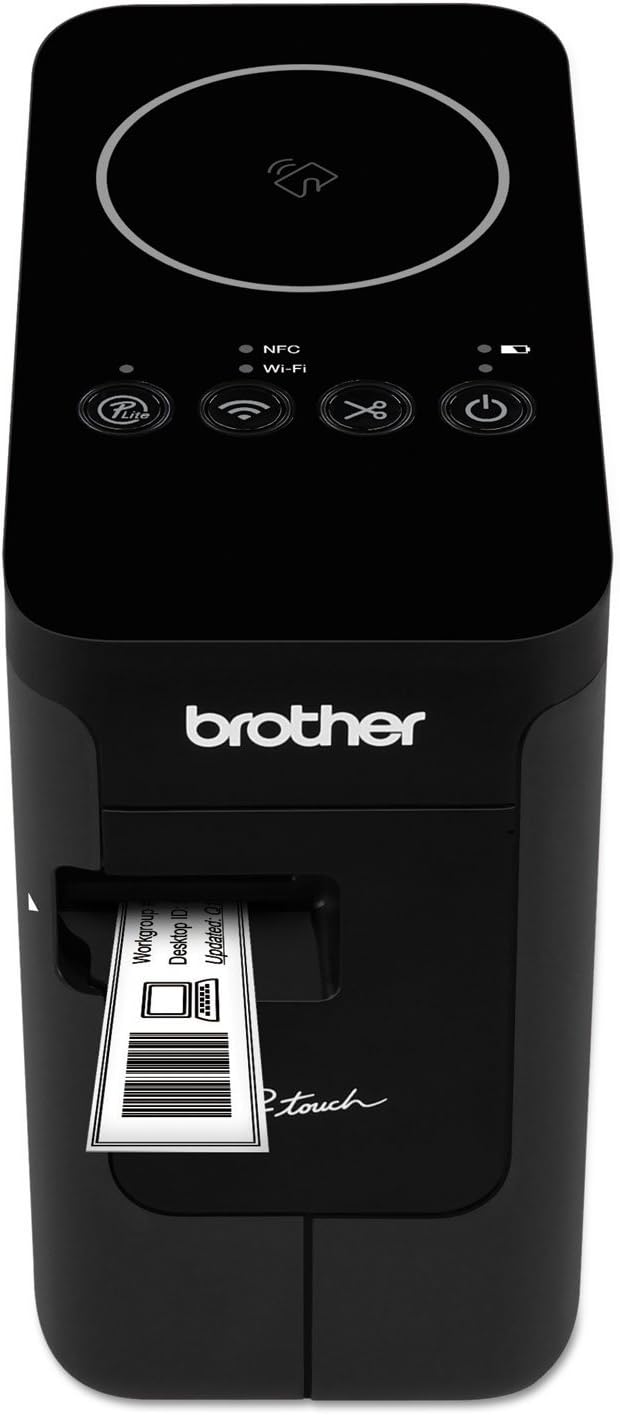
The Brother P-touch PT-P750W is a versatile wireless label maker designed for professionals who demand high-quality, customizable labels. Featuring NFC and Wi-Fi connectivity, it supports printing from multiple devices including iOS and Android via a dedicated app. With 360 dpi resolution, automatic tape cutting, and flexible power options including AC, batteries, or rechargeable packs, it’s built for both office and on-the-go use. Compatible with Brother’s genuine TZe tapes up to 24mm, it ensures durable, professional-grade labeling every time.

| ASIN | B00JHME7W4 |
| Additional Printer Functions | Print Only |
| B&W Pages per Minute | 1 |
| Best Sellers Rank | #42,453 in Office Products ( See Top 100 in Office Products ) #50 in Label Makers |
| Brand | Brother |
| Built-In Media | Brother PT-P750W Wireless Label Maker |
| Color | Black |
| Color Depth | 1 bpp |
| Color Pages per Minute | 1 ppm |
| Compatible Devices | Laptops, PC, Smartphones |
| Connectivity Technology | USB |
| Control Method | App |
| Controller Type | Android, iOS |
| Customer Reviews | 4.1 out of 5 stars 455 Reviews |
| Dual-sided printing | Yes |
| Duplex | Simplex |
| Global Trade Identification Number | 00012502637226 |
| Hardware Interface | USB |
| Ink Color | black |
| Item Dimensions D x W x H | 3.1"D x 6"W x 5.6"H |
| Item Type Name | Brother PT-P750W Wireless/NFC Capable Label Printer for PC/Mac |
| Item Weight | 1.8 Pounds |
| Manufacturer | Brother Printer |
| Maximum Copy Resolution Black and White | 360 dpi |
| Maximum Copy Resolution Color | 180 x 360 dpi |
| Maximum Copy Speed Black and White | 1 ppm |
| Maximum Media Size | Paper Roll |
| Maximum Print Resolution Black and White | 180 x 360 dpi |
| Maximum Sheet Capacity | 1 |
| Maximum print Resolution Color | 180 x 360 dpi |
| Model Name | PTP750W |
| Model Number | PTP750W |
| Model Series | Touch |
| Number of Licenses | 1 |
| Number of Trays | 1 |
| Other Special Features of the Product | Wireless |
| Output sheet capacity | 1 |
| Paper Size | 1.18 |
| Print media | Labels |
| Printer Connectivity Type | USB |
| Printer Output Type | Monochrome |
| Printer Type | Thermal |
| Printing Technology | Thermal |
| Resolution | 180 x 360 dpi |
| Special Feature | Wireless |
| Specific Uses For Product | personal |
| Total USB 2.0 Ports | 1 |
| Total Usb Ports | 1 |
| UPC | 012502637226 |
| Unit Count | 1.0 Count |
| Warranty Description | ... |
| Warranty Type | limited warranty |
K**R
Fast, versatile label maker for home or office use
I’ve been very happy with this label printer. Setup was straightforward, and the wireless connection makes it easy to print labels directly from a phone or computer. The print quality is excellent, and it handles different label sizes without any trouble. It’s fast, quiet, and feels well built. I like being able to customize labels quickly without being tied to one device. After regular use, it’s proven to be reliable and efficient. Great option if you need a flexible, professional-quality label maker. Stars: ⭐⭐⭐⭐⭐
W**S
Great Price, Works, No Battery Required!
I added the 4 year square trade warranty on this thing because often enough, I only start to see problems after the 1 year manufacture warranty expires. Having said that, the price on the warranty started at $21 and then went to $10, when it finally hit $8. I hit the buy button. I used to use a DYMO label printer. And I can safely say that this one has alot more options when printing labels, they come out better, and it spits your label out, which the DYMO does not. I feel like this is a better product, because it doesn't use a battery, and it has alot more software options for printing. You can also find numerous 1 inch label colors, and label materials. Where the DYMO was limited to a very small selection, and it cost alot more... so there you have. A official DYMO killer label maker that is around $100.
A**R
Good value for the price. Covers only 75% of tape width. Misleading resolution (180dpi) in spec.
First, the good bits: * Excellent build quality, which we have come to expect from Brother products. * Multiple connectivity options: USB (of course), two WiFi modes, NFC. * Does half-cuts, which is essential for removing the tape backing if the tape you are using does not have a split backing. Of course, also does chain-printing, so you do not waste tape if you are printing large batches and/or multiple copies of labels. * Their editor is more than adequate, especially now that it does all sorts of barcodes and labels for wiring. And if you really must, you can always design in another editor and import as a .png image, although that's an overkill. Now for the complaints: * The print head is not large enough to cover the full 24mm tape. This is not documented anywhere on the web site or the printer manual. I did manage to find the specs for the printhead in the SDK documentation, and it is only 128pixels, which at 180dpi gives a usable height of ~18mm. This is reflected in the editor, there is an ~18mm frame showing the print area, but it is annoying that a quarter of the tape is wasted in margins. * Worse, narrower tapes *still* enforce vertical margins instead of printing on the entire tape. To wit: on the 18mm (0.7'') tape, the printable area in the editor is 16mm. Now, there is some logic behind not allowing full-bleed printing: the positioning of the tape is not totally accurate, and if there is no tape to carry away the heat of part of the print head, the latter may be damaged. Still, I should have an option to risk that. * The WiFi setup was confusing: in the WDS mode, where the printer initially acts as a WiFi access point so you can connect to it, the configuration URL (/general/status.html) is missing. It's only after you have set up the printer to work with your local WiFi network that the URL becomes active. Not that there is anything useful you can do; it would be nice if they had included a light version of the editor. Overall: more than adequate for light use.
T**.
Connectivity is a disaster, at least for Mac and iOS.
I like my older and still working P-Touch PT-2700 but for some reason the current Brother software (which is required for current macOS) doesn't support it. (At least the PT-2700 has a keyboard and display so it can work standalone.) So I sprung for this seemingly good PT-P750W which uses the same printer tapes and probably prints just the same, and works with the current P-Touch Editor (required since there is no keyboard input). However, the setup and connection options are awful and almost totally broken. I wasted 45 minutes and found only 1 possible configuration which is terrible. There is a USB connection but it cannot be used for printing (only for mounting the obsolete and incompatible version of the software as a USB disk, so you have to figure out that there is a different app on the Mac AppStore, not like what the outdated documentation says). There is a WiFi connection but it can only be used to print if you make it your computer's WiFi connection (and this is not simple to set up), which disconnects you from the internet while in use. There seems to be no way to change the default WiFi password 00000000 (the password printed on the label did not work), and neither password worked when attempting to connection from an iPhone. The NFC capability did not work at all; touching the iPhone to the NFC panel brought up an alert on the iPhone saying something about no data available. The hardware part of this printer is appealing but the connectivity and software is an utter disaster. Returned for refund.
G**C
Just a few rough edges, but no show-stoppers.
The PT-P750W offers so many different ways to connect and print that's it's almost a drawback. All this sophistication results in a somewhat confusing initial setup process. It can also be confusing when switching between the connectivity modes, but once you get the hang of it this printer works great. I was disappointed to find out that wireless printing is only possible with the included AC power-adapter or the optional BA-E001 Li-ion battery pack, but not with regular AA batteries. Getting the Li-ion battery significantly raises the overall cost of the solution, but is probably worth it for those that will frequently take it mobile, especially if they plan to use with their smartphone. I suppose it's good that the PT-P750W is sold without the battery to lower the cost for those that don't need it. Printing from my Windows10 laptop works fine, whether via USB cable with AA batteries, or via WiFi with the AC adapter. Printing from my Android phone also works well via WiFi or WiFi-Direct either one. I never could get NFC to work, but I think all it's supposed to do is launch the Brother app, so that's no big deal. The app sees the printer as soon as I fire it up, and detects what type of label stock is installed and how much is left. The Android app is handy. It provides a lot of templates, allows you save your own formats, and has good editing capabilities, but the Windows software is easier in the long run. The formats are compatible between the Windows and Android platforms, so you can manually copy them over from your PC and then print from your smartphone. What would really be cool is if the mobile app could link directly to your cloud storage repository! I've not tried the software-less "P-Lite" printing mode, and doubt I will. I selected this model specifically for the Windows software capability. The PT-P750W takes up no more space in my toolkit than the battery-powered QWERTY (but non-connectable) PT-1280 I've had for years. It also handles a wider range of label sizes, up to 1". I had planned to keep this printer in my office, but with all the functionality and portability, I'll probably take it with me sometimes. I've used the P-Touch system for probably 20 years, and the laminated labels have always adhered well and been very durable. The PT-P750W is a great addition to the product line for those that need the power of a connected device.
D**B
Awesome For I.T. Needs
I saw a subcontractor make quick and lite work of labeling IT equipment on a new construction. My other Brother desktop/portable printer just died after 9 years of printing abuse and had to have this unit. I suggest you get the battery brick to make it rechargeable and portable, but even without it, regular batteries work very well and it doesn't drain them too quickly. I've used via wireless and USB cable with my laptop and using the NFC on my phone to quickly attach and print. It has the lite version of the p-touch software but register and get the full version that allows you to make precise labels to work perfectly on Patch Panels, for wall plate circuit ID, even I brought in my company logo and it adjusted size and printed beautifully. I hope it lasts as long as my other one, but even if that one was still working, this P750W just put that other one on the shelf collecting dust. For my work, Invaluable! Yes, I am very well aware of some other "professional" labelers at 3 and 4 times the cost...No, I prefer the functions and features of the P750W, as well as the control I have to adjust much easier than others can do.
S**R
Have one at work, Now very happy to have one at home
When it comes to label makers, spend a little extra and get this one. My wife asked why I was buying it when she had two other hand held, cheaper machines. I quickly made a label with a picture on it and asked if hers could do this. :) Obviously not. Didn't take long to win her over. So you can print a label from your phone or you PC. Setup was extremely easy. Just plug it into the USB on your PC, and it will load and install the software, and it easily finds your Wifi. After setup you don't need to cable to your computer. There's an app to download on your phone, we have iPhones, and it works great. At first you may not like the fact that there is no keyboard on it, but when you start to use your phone or PC, you'll realize just how much easier it is. Plus, you can easily change fonts, make multi-line labels, add tables, graphs, photos and more. You can get a variety of tape widths from 1/4" (6mm) up to 1" wide. There is a less expensive version that only works with USB, but I figured that I'm going to have this for a long time, so why not spend just a bit more and get one that everyone in the house can use from their phones or laptops, and without cables.
R**N
Works as intended
Works good…sometimes it’s difficult to connect maybe my fault?..otherwise works as intended.
F**E
Es justa, pero que no es resistente
La impresora es buena, pero que es la segunda que compro en menos de 3 meses, pues se ha estropeada fácilmente con un golpe y tiene que instalar un montón de softwares para que funcione. Su precio no es barato y cualquier golpecito se estropea fácilmente.
G**K
Brother Printer PTP750W Wireless Label Maker
bought as a replacement for older Brother label maker. Works very well
C**R
One of the best PTouch
This Ptouch model is the one is the best to print labels with a good resolution to print 2D bare core labels. I did buy 5 for our LAB inventory and no failure observed.
S**T
Printer works but had some scuff marks
Main thing is the at the printer does what it supposed to do and it does it well. The only minor thing is, it had a few scuff marks on the case. Other than that... Thumbs up
T**.
Oh BROTHER! What BOTHER.........
DO NOT BUY - if you hover over the "Eligible for Refund or Replacement" under the BUY NOW button it says this: "This item is non-returnable, but if the item arrives damaged or defective, you may request a refund or replacement." Luckily I used the chat agent and they issued a refund and notified me the item was destroy in field. Happy to oblige! Now WHY did I return it? Its a hunk of junk. I should have known it was bad as soon as I unboxed and noticed its USB connector on the back is MINI USB!! 2004 called, they want their USB connector back. - It will not broadcast wifi on battery power - only AC power - The RFID does not work with iPhone, only Android. - once spent over an hour messing with the machine and the iPhone app I finally get my phone to connect, and it will not print. "error communicating" Spent another hour messing with it after that. So if you want a boat anchor that only works when tethered to a PC, the totally by this. If you want a modern, easy to use mobile device with modern technology that will print on shrink tube up to 24mm, look at the Epson version.
Trustpilot
2 weeks ago
2 months ago